
40% of small businesses fail due to poor management, and one key aspect of management is the use of Point of Sale (POS) systems – which are essentially computerized systems (hardware and software) that manage the sales process and handle transactions – to streamline operations and enhance customer experience. For a beginner who has just discovered the concept of POS systems, it is essential to understand the significance of these systems in the business world. A POS system is not just a cash register, but a comprehensive tool that can help businesses manage their sales, inventory, and customer data. Effective use of POS systems can make a significant difference in the success of a business, especially in the retail and hospitality industries. However, many businesses make common mistakes when implementing and using POS systems, which can hinder their effectiveness.
📝 Contents
Breaking Down POS Systems
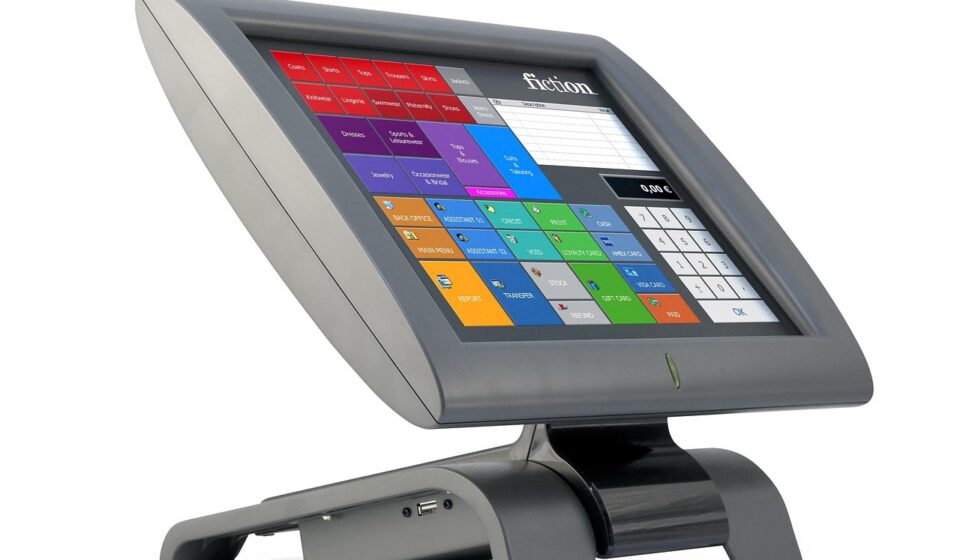
A POS system typically consists of hardware (such as a terminal, printer, and barcode scanner) and software (which manages the sales process and handles transactions) – think of it like a computer (hardware) and the programs it runs (software). The software is the brain of the operation, allowing businesses to manage their sales, inventory, and customer data in a centralized and organized manner. To better understand POS systems, let’s break down some key terms:
| Term | Plain-English Meaning |
|---|---|
| POS System | A computerized system that manages the sales process and handles transactions – similar to a very advanced cash register. |
| Inventory Management | The process of tracking and managing the quantity of products or goods that a business has in stock – essentially keeping count of what you have and what you need to order more of. |
| Customer Relationship Management (CRM) | A system that helps businesses manage their interactions with customers, including contact information, purchase history, and communication – like a digital address book that also remembers what your customers like and dislike. |
| Barcode Scanner | A device that reads the barcode (a series of lines and spaces that represent different numbers and letters) on a product and enters the product information into the POS system – making checkout faster and more accurate. |
| Receipt Printer | A device that prints out receipts for customers after a transaction has been completed – providing a paper record of the sale. |
| Cloud-Based POS | A POS system that stores its data and operates over the internet, rather than on a local computer or server – allowing access to the system from anywhere with an internet connection. |
Why POS Systems Matters
POS systems are crucial for businesses of all sizes, as they help to streamline operations, enhance customer experience, and increase revenue. According to a study, businesses that use POS systems can increase their sales by up to 15% and reduce their inventory costs by up to 20%. This is because POS systems provide businesses with accurate and real-time data on sales, inventory, and customer behavior, allowing them to make informed decisions and adjust their strategies accordingly. For example, a retail business can use a POS system to track the sales of different products and adjust their inventory levels accordingly, reducing waste and overstocking. Additionally, POS systems can help businesses to improve their customer service by providing them with a faster and more efficient checkout process, as well as personalized promotions and offers based on their purchase history.
However, common mistakes can hinder the effectiveness of POS systems. One common mistake is not properly training staff on how to use the system, which can lead to errors and inefficiencies. Another mistake is not regularly updating the system and its software, which can leave the business vulnerable to security breaches and technical issues. Furthermore, businesses that do not properly integrate their POS system with other systems, such as inventory management and customer relationship management, can miss out on the full benefits of the system and experience inconsistent data and processes.
POS systems can benefit a wide range of businesses, from small retail shops to large restaurants and hotels. For example, a restaurant can use a POS system to manage their table reservations, orders, and payments, as well as to track the sales of different menu items and adjust their menu accordingly. A hotel can use a POS system to manage their room bookings, guest information, and payment processing, as well as to track the sales of amenities and services such as the hotel bar and spa. By using a POS system, businesses can improve their operational efficiency, enhance their customer experience, and increase their revenue and profitability.
POS Methods Worth Knowing
1. Choosing the Right POS System
Choosing the right POS system is crucial for businesses, as it can help to streamline operations, enhance customer experience, and increase revenue. To choose the right POS system, businesses should consider their specific needs and requirements, such as the type of products they sell, the size of their business, and their budget. They should also research different POS systems and read reviews from other businesses to find the one that best fits their needs. For example, a small retail business may need a simple and affordable POS system, while a large restaurant may need a more complex and feature-rich system.
Businesses can start by researching different POS systems online, reading reviews and comparing features and prices. They can also contact different POS providers and ask for demos or trials to see the system in action. Additionally, businesses should consider the scalability of the system, as well as its integration with other systems such as inventory management and customer relationship management. A common beginner mistake is choosing a POS system that is too complex or expensive for their business, which can lead to frustration and inefficiencies.
- Why It Works:
- Streamlines operations and enhances customer experience
- Increases revenue and profitability
- Provides accurate and real-time data on sales, inventory, and customer behavior
2. Setting Up the POS System
Setting up the POS system is a crucial step in implementing the system and ensuring its effectiveness. To set up the POS system, businesses should start by installing the hardware and software, and then configuring the system to meet their specific needs and requirements. This may include setting up the menu or product list, configuring the payment processing, and integrating the system with other systems such as inventory management and customer relationship management.
Businesses should also train their staff on how to use the system, including how to process transactions, manage inventory, and access customer data. Additionally, businesses should test the system to ensure that it is working correctly and make any necessary adjustments. A common beginner mistake is not properly testing the system, which can lead to errors and inefficiencies. For example, a business may not test the system’s payment processing, only to find out that it is not working correctly on the first day of use.
- Why It Works:
- Ensures the system is working correctly and efficiently
- Provides staff with the necessary training and support
- Helps to prevent errors and inefficiencies
3. Managing Inventory
Managing inventory is a crucial aspect of any business, and a POS system can help to streamline this process. To manage inventory, businesses should start by tracking the quantity of products or goods that they have in stock, and then adjusting their inventory levels accordingly. This may include ordering more products when stock levels are low, or reducing inventory levels when products are not selling well.
Businesses can use the POS system to track their inventory levels in real-time, and to receive alerts when stock levels are low. They can also use the system to manage their suppliers and vendors, and to track the cost of goods sold. Additionally, businesses can use the system to analyze their sales data and identify trends and patterns in customer behavior. A common beginner mistake is not properly tracking inventory levels, which can lead to stockouts or overstocking.
- Why It Works:
- Helps to prevent stockouts and overstocking
- Reduces waste and excess inventory
- Improves customer satisfaction and loyalty
4. Processing Transactions
Processing transactions is a critical aspect of any business, and a POS system can help to streamline this process. To process transactions, businesses should start by configuring the system to accept different payment methods, such as cash, credit cards, and mobile payments. They should also train their staff on how to use the system to process transactions, including how to handle refunds and exchanges. process transactions businesses
Businesses can use the POS system to process transactions quickly and efficiently, and to provide customers with a seamless and convenient checkout experience. They can also use the system to track sales data and analyze customer behavior, including which products are selling well and which payment methods are most popular. Additionally, businesses can use the system to manage their cash handling and reconciliation, and to reduce the risk of errors and theft. A common beginner mistake is not properly configuring the system to accept different payment methods, which can lead to errors and inefficiencies.
- Why It Works:
- Provides customers with a seamless and convenient checkout experience
- Reduces errors and inefficiencies
- Helps to improve customer satisfaction and loyalty
5. Analyzing Sales Data
Analyzing sales data is a crucial aspect of any business, and a POS system can provide businesses with valuable insights into customer behavior and sales trends. To analyze sales data, businesses should start by tracking their sales data in real-time, including which products are selling well and which payment methods are most popular. They can also use the system to analyze customer behavior, including which customers are most loyal and which products they tend to purchase.
Businesses can use the POS system to identify trends and patterns in sales data, and to make informed decisions about their business. For example, they may use the system to identify which products are selling well and adjust their inventory levels accordingly. They can also use the system to identify which customers are most loyal and offer them personalized promotions and offers. Additionally, businesses can use the system to track their sales performance over time, and to identify areas for improvement. A common beginner mistake is not properly analyzing sales data, which can lead to missed opportunities and inefficiencies.
- Why It Works:
- Provides valuable insights into customer behavior and sales trends
- Helps businesses to make informed decisions
- Improves sales performance and customer satisfaction
6. Integrating with Other Systems
Integrating the POS system with other systems, such as inventory management and customer relationship management, is crucial for businesses that want to get the most out of their POS system. To integrate the POS system with other systems, businesses should start by identifying which systems they need to integrate with, and then configuring the POS system to work with those systems.
Businesses can use the POS system to integrate with other systems, such as accounting software and e-commerce platforms, to provide a seamless and efficient experience for customers and staff. They can also use the system to integrate with social media and marketing platforms, to provide personalized promotions and offers to customers. Additionally, businesses can use the system to integrate with inventory management and supply chain management systems, to improve their inventory levels and reduce waste. A common beginner mistake is not properly integrating the POS system with other systems, which can lead to errors and inefficiencies.
- Why It Works:
- Provides a seamless and efficient experience for customers and staff
- Improves inventory levels and reduces waste
- Helps to improve customer satisfaction and loyalty
7. Maintaining and Updating the POS System
Maintaining and updating the POS system is crucial for businesses that want to ensure that their system is working correctly and efficiently. To maintain and update the POS system, businesses should start by regularly updating the software and hardware, and then configuring the system to meet their changing needs and requirements.
Businesses can use the POS system to maintain and update their system, including updating the software and hardware, and configuring the system to work with new payment methods and technologies. They can also use the system to train their staff on new features and functionality, and to provide ongoing support and maintenance. Additionally, businesses can use the system to monitor their system’s performance, and to identify and fix any errors or issues. A common beginner mistake is not properly maintaining and updating the POS system, which can lead to errors and inefficiencies.
- Why It Works:
- Ensures the system is working correctly and efficiently
- Provides staff with the necessary training and support
- Helps to prevent errors and inefficiencies
| Step | What You Do | Expected Result |
|---|---|---|
| 1. Choose the right POS system | Research and compare different POS systems, and choose the one that best fits your business needs | A POS system that meets your business needs and provides a seamless and efficient experience for customers and staff |
| 2. Set up the POS system | Install the hardware and software, and configure the system to meet your business needs | A POS system that is working correctly and efficiently, and provides a seamless and convenient checkout experience for customers |
| 3. Manage inventory | Track and manage your inventory levels, and adjust your inventory levels accordingly | Inventory levels that are optimized and efficient, and a reduction in waste and excess inventory |
| 4. Process transactions | Configure the system to accept different payment methods, and train staff on how to use the system to process transactions | A seamless and convenient checkout experience for customers, and a reduction in errors and inefficiencies |
| 5. Analyze sales data | Track and analyze your sales data, and use the insights to make informed decisions about your business | Valuable insights into customer behavior and sales trends, and informed decisions about your business |
| 6. Integrate with other systems | Integrate the POS system with other systems, such as inventory management and customer relationship management | A seamless and efficient experience for customers and staff, and improved inventory levels and reduced waste |
| 7. Maintain and update the POS system | Regularly update the software and hardware, and configure the system to meet your changing needs and requirements | A POS system that is working correctly and efficiently, and provides a seamless and convenient experience for customers and staff |
Frequently Asked Questions
1. What is a POS system and how does it work?
A POS system is a computerized system that manages the sales process and handles transactions. It typically consists of hardware and software, and can be used to track sales, manage inventory, and analyze customer behavior. The system works by processing transactions, tracking sales data, and providing insights into customer behavior and sales trends. track sales manage
2. What are the benefits of using a POS system?
The benefits of using a POS system include improved operational efficiency, enhanced customer experience, and increased revenue and profitability. The system can help businesses to streamline their operations, reduce errors and inefficiencies, and provide valuable insights into customer behavior and sales trends.
3. How do I choose the right POS system for my business?
To choose the right POS system for your business, you should consider your specific needs and requirements, such as the type of products you sell, the size of your business, and your budget. You should also research different POS systems and read reviews from other businesses to find the one that best fits your needs.
4. How do I set up and configure my POS system?
To set up and configure your POS system, you should start by installing the hardware and software, and then configuring the system to meet your business needs. You should also train your staff on how to use the system, and provide ongoing support and maintenance to ensure that the system is working correctly and efficiently.
5. What are some common mistakes to avoid when using a POS system?
Some common mistakes to avoid when using a POS system include not properly training staff on how to use the system, not regularly updating the software and hardware, and not properly integrating the system with other systems such as inventory management and customer relationship management. These mistakes can lead to errors and inefficiencies, and can hinder the effectiveness of the system.
To Sum Up
POS systems are crucial for businesses of all sizes, as they help to streamline operations, enhance customer experience, and increase revenue and profitability. By following the steps outlined in this guide, businesses can choose the right POS system, set it up and configure it, and use it to improve their operations and customer experience. With the right POS system and proper training and support, businesses can improve their sales performance, customer satisfaction, and overall success.
By understanding the importance of POS systems and how to use them effectively, businesses can make informed decisions about their operations and customer experience. They can also identify areas for improvement and make changes to optimize their POS system and improve their overall performance.
Ultimately, the key to getting the most out of a POS system is to choose the right system, set it up and configure it correctly, and use it to improve operations and customer experience. With the right POS system and proper training and support, businesses can achieve their goals and succeed in today’s competitive market.
Don't Miss These


One More Thing